21-01-2026 read time: 5 min.
Global Secure Access - Conditional Access Integration

Welcome to my second blogpost!
This time it will be a slightly smaller one.
In my first post I talked about how an organization can benefit from using Microsoft Entra Private Access when they want to provide users with access to their on-premises environment and their legacy applications.
This time I like to talk about how you can secure your Private Access enterprise applications and how to do that.
First of all I’d like to point out that every organization has their own company security policies and laws they need to comply with and that consulting your security officer for the required settings is important. I will only point out the possibilities and not what you should configure.
First of all, what applications do you have?
Before you start building Conditional Access policies, it’s very important to have a clear view of what kind of applications you have. What is the risk level of the applications and how strict does your CA policy needs to be for that applications? Based on that you can define your different policies with different settings.
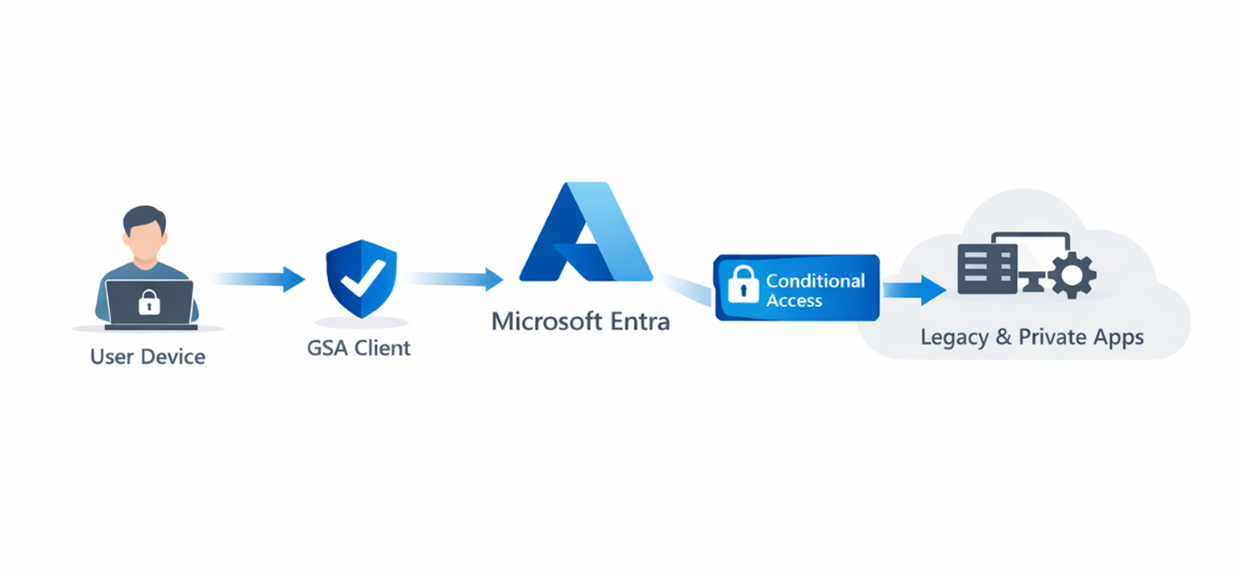
Enable CA Signaling for Entra ID
The first thing you need to do is to enable CA signaling for Entra ID. When you do this, GSA will send signals to Conditional Access about the traffic of the client and that it is coming from the GSA service. GSA traffic will then always be recognised as originating from a Compliant Network. With this you can build your Conditional Access policies in a more granular and effective way than previously possible.
How to enable:
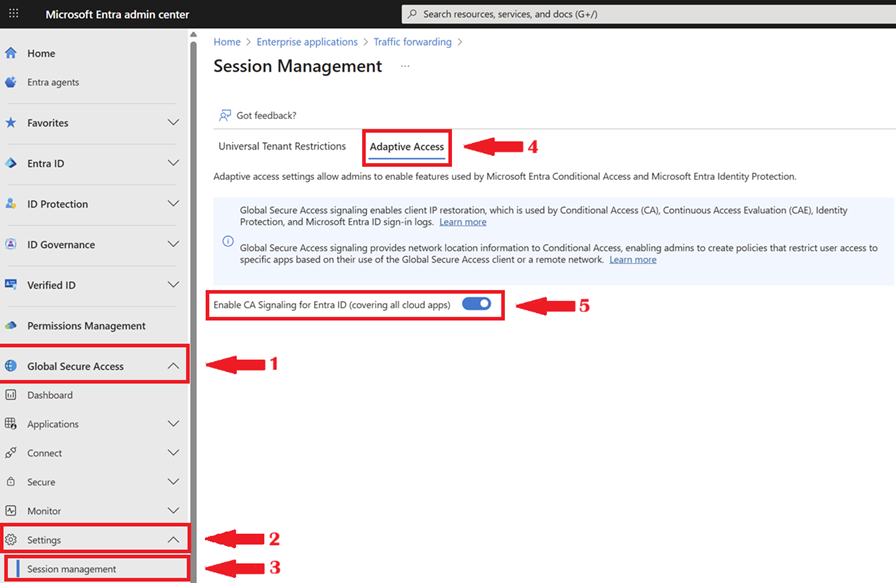
In Entra Admin Center open 1. Global Secure Access, 2. Open Settings, 3. Open Session Management, 4. Open the Adaptive Access tab, 5. Set Enable CA Signaling for Entra ID.
Continuous Access Evaluation
When CA Signaling is enabled there is something extra happening. It will send realtime information about the session and location (IP information network context and risk factors). Also Continuous Access Evaluation comes in play which makes re-evaluation of your session possible in realtime. If for example a user switches to a higher risk location Entra will immediately restrict the session and if needed ends the session. So CA Signaling makes Conditional Access more responsive and dynamic.
Conditional Access Policies
After you enabled CA signaling for Entra ID you can start building your conditional access policies. You can first build a baseline policy which blocks all traffic other than coming from a compliant network and assign it to your Private Access Enterprise Applications. After you enabled that policy you can create your conditional access policies based on your organisations and applications needs.
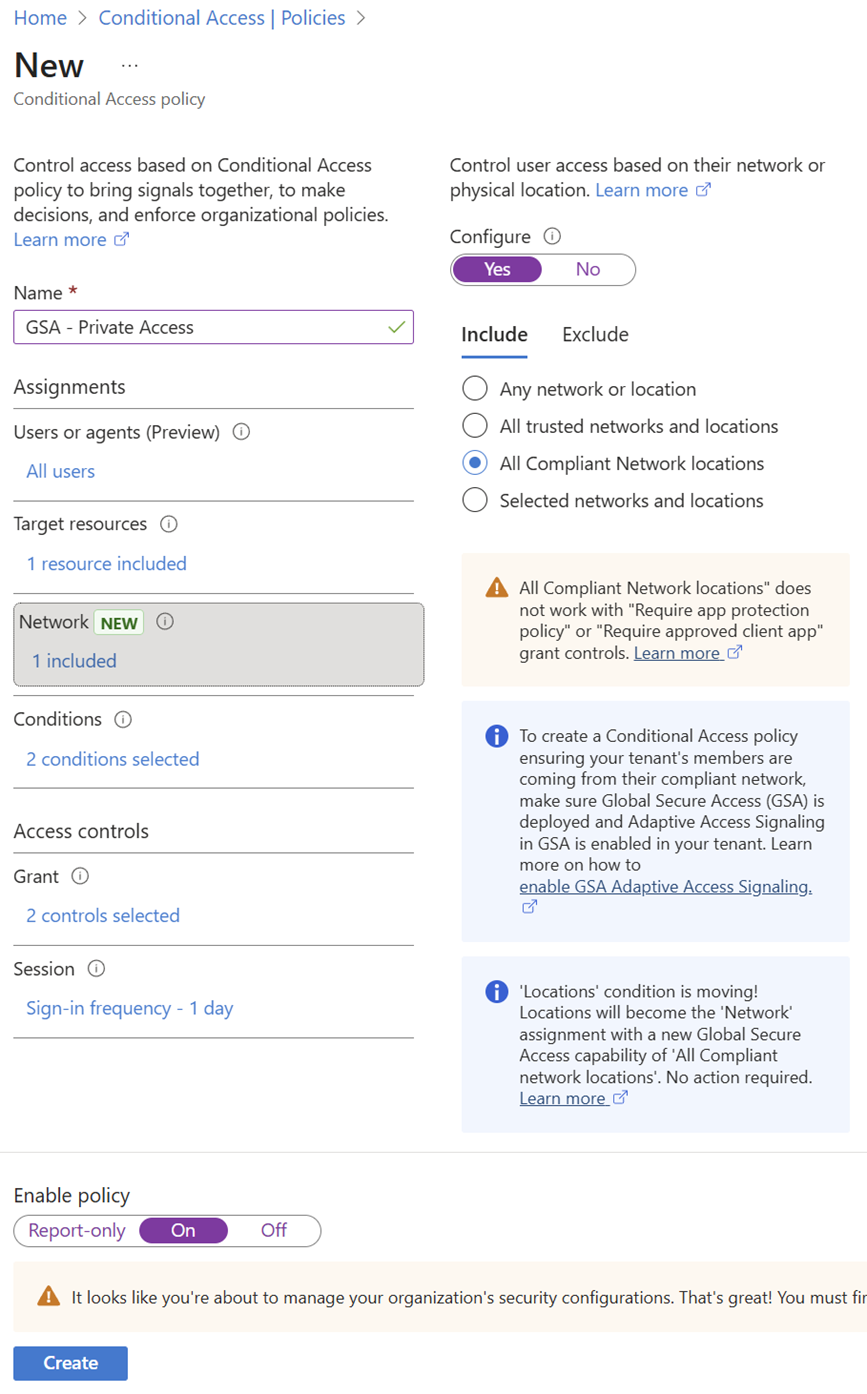
For example if you have an application which has standard security requirements you can build a basic CA policy with rules like:
- A compliant device
- MFA every 24 hours
- A user risk of medium or lower
- All Compliant Network locations
I have configured this policy in the screenshot above.
You can assign this policy to your lower risk applications.
If on the other hand you have applications with high security requirements you can build a policy with rules like:
- A compliant device
- A user risk of low
- MFA every hour
- All Compliant Network locations
You can assign this policy to your high risk applications. This way you can really fine grain your policies. On both policies you have to make sure it needs to come from a compliant network, which is a GSA client by default. This together can enhance your security significantly.
Why these policy settings?
Compliant device
I think it’s important to require a compliant device, so access is only granted from devices that are checked against the security requirements that are important for the organisation. This ensures that unmanaged or non-compliant devices can’t access applications, even if valid credentials are used.
User risk
I think it makes sense to differentiate based on the type of application and the sensitivity of the data. Low-risk applications can tolerate a higher user risk, while high-risk or sensitive applications should only be accessible when the user risk is low. The higher the risk of the application, the lower the acceptable user risk should be.
MFA frequency
The higher the risk of the application and its data, the stricter the policy should be. This also means MFA checks need to happen more frequently for high-risk applications, while lower-risk applications can have a less strict MFA frequency to reduce user impact.
Compliant network
I think it’s important that the device is enrolled and using the Global Secure Access client. By requiring a compliant network, all other attempts to access on-premises applications outside of GSA are denied by default.
Important considerations
Of course you can also choose to block all traffic other than coming from a compliant network but at that moment you need to have a very clear view of who your guests, external organisations and other users who need access to your tenant are and create exclusions for them, otherwise you will block access for them. Also always make sure you have a break-glass account configured as an exclusion to always be able to access your tenant and policies if needed in case of an emergency.
Summary
In this post I explained how you can secure your Microsoft Entra Private Access enterprise applications using Conditional Access. By enabling CA Signaling for Entra ID, traffic from the Global Secure Access client is recognized as coming from a compliant network, and real-time session and location information is sent, enabling Continuous Access Evaluation. This makes Conditional Access more responsive and dynamic, so sessions can be re-evaluated instantly if risk levels change. From there, you can build baseline and fine-grained policies based on application risk, combining compliant devices, MFA, and user risk to significantly enhance security while keeping flexibility for different use cases.
Thanks again for visiting my blog and I hope you enjoyed reading this post. Please feel free to leave a message if you enjoyed it, have questions, feedback or have found a mistake, I would really appreciate it!