Web Content Filtering V2: Rule-Based Design
19-06-2026 read time: 10 min.
Hi! Welcome back to another post about Global Secure Access (GSA).
I know I promised a full series on GSA Internet Access, and that’s still coming. But last week something caught my attention that I couldn’t ignore.
When I logged into the Entra portal and checked the Web Content Filtering policies, I noticed a label: “Deprecating soon.”
That was unexpected. I had just built an entire environment based on these policies, so seeing that message immediately raised questions.
Is this really being deprecated? What replaces it? And more importantly… what changes from a design perspective?
That’s what I started digging into. In this post, I’ll walk you through what I found: how the new V2 model works, what actually changed, and why this is more than just a small update to the UI.
V1 vs V2 – What actually changed?
At first glance, the new Web Content Filtering model in Global Secure Access might feel like a step back.
In the V1 model, you could combine multiple policies within a single profile, which gave you a lot of flexibility. Need to block social media, gambling and add a few exceptions? Just create separate policies and attach them all to the same profile.
In V2, that approach no longer works.
You are now limited to one Web Content Filtering policy per type per Security Profile. At first, that feels restrictive. But in reality, the flexibility hasn’t disappeared, it has simply moved to a different layer.
From policies to rules
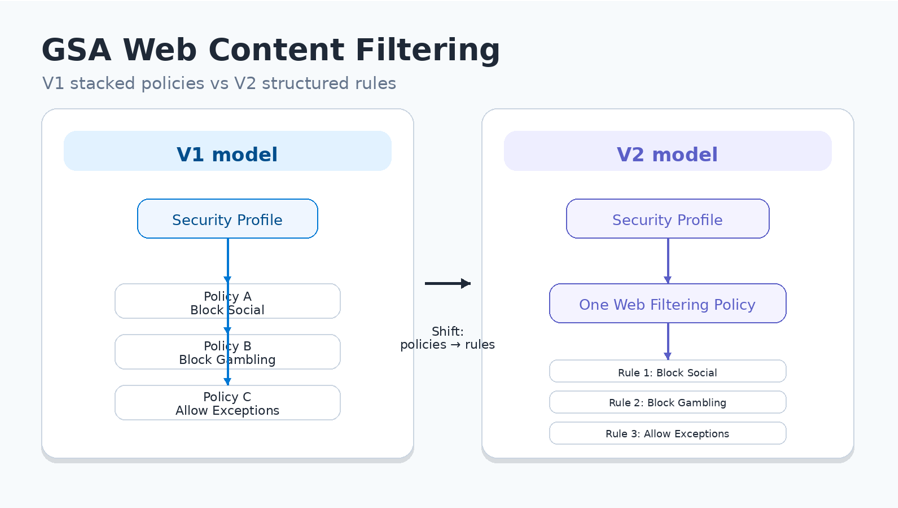
The biggest change is how you design your filtering logic.
In V1:
- Policies were the building blocks
- You combined multiple policies to achieve the desired outcome
In V2:
- Rules are the building blocks
- You consolidate your logic into a single policy
For example:
V1 approach
Profile →
- Policy A → Block Social Media
- Policy B → Block Gambling
- Policy C → Allow Exceptions
V2 approach
Profile →
Web Filtering Policy →
- Rule A → Block Social Media
- Rule B → Block Gambling
- Rule C → Allow Exceptions
You’re no longer stacking policies, you’re designing a structured rule set inside one policy.
Flexibility didn’t disappear, it moved
This is the key shift:
In V1, flexibility came from combining multiple policies.
In V2, flexibility comes from using multiple Security Profiles.
Instead of thinking:
- “Which policies do I attach?”
You now think:
- “Which profile applies to this user, device, or scenario?”
That opens the door to much cleaner designs, especially when combined with Conditional Access.
More predictable, less fragile
Another important improvement is how policies are evaluated.
In V1:
- Policy evaluation could become unclear
- Overlapping policies could lead to conflicts
- Troubleshooting was sometimes guesswork
In V2:
- There is a clear and predictable evaluation model
- One policy per type reduces conflicts
- Behaviour is easier to understand and troubleshoot
This aligns much better with modern SSE (Security Service Edge) architecture, where consistency and predictability are key.
New capabilities in V2
The new model is not just a structural change, it also brings new capabilities that simply didn’t exist in V1.
Traffic awareness
In V2, you can differentiate based on traffic type:
- Agent traffic
- Browser traffic
- Application traffic
This enables scenarios like:
- Blocking AI tools in the browser, but allowing them through controlled apps
- Applying different policies for BYOD vs managed devices
HTTP method filtering
You can now define rules based on HTTP methods:
- GET (read)
- POST (upload)
- PUT / PATCH (modify)
For example:
- Allow: GET → chat.openai.com
- Block: POST → chat.openai.com
This means users can access a service, but cannot upload data to it.
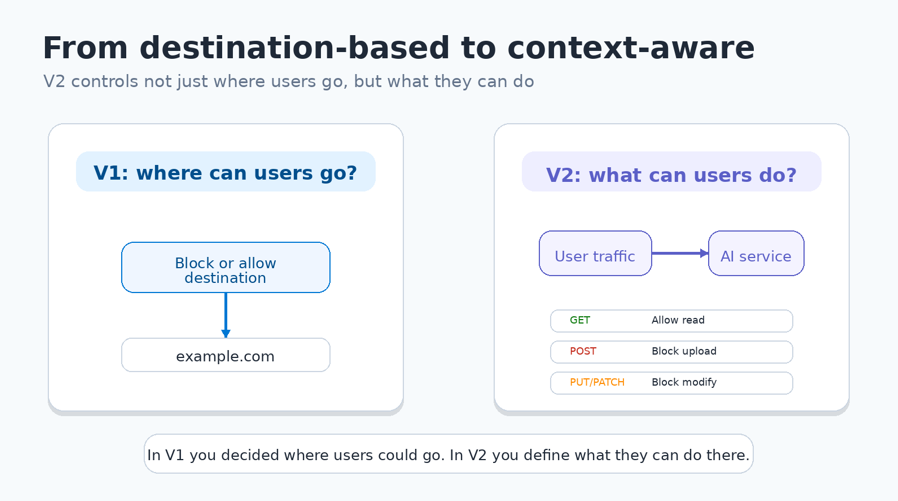
The shift from V1 to V2 is not just a UI change or a limitation, it’s a different way of thinking.
In V1, you decided if a user could go somewhere.
In V2, you decide what a user is allowed to do there.
And that’s a big step forward.
What to do with existing environments?
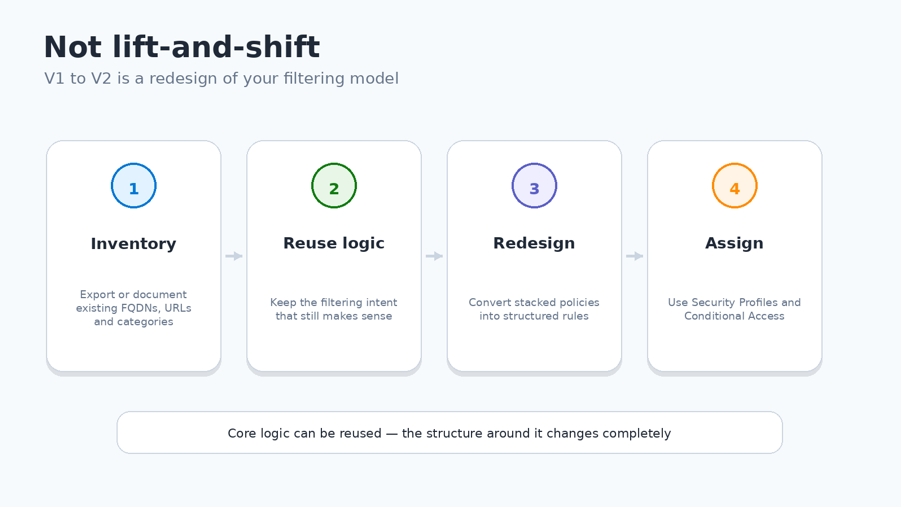
One important thing to keep in mind: there is no direct migration path from V1 to V2.
If you already built your environment using V1 policies, you can’t simply convert or upgrade them. There is no automated way to translate your existing setup into the new model.
Instead, you’ll need to recreate your configuration manually.
The good news is that the core logic, your FQDNs, URLs, and categories, can still be reused.
But the structure around it changes completely.
Where you previously:
- Combined multiple policies
- Assigned them to a single profile
You now need to:
- Consolidate rules into a single policy
- Rethink how policies are grouped
- Reassign everything using Security Profiles and Conditional Access
In other words, this is not a lift-and-shift migration, it’s a redesign of your filtering model.
Deprecated, but when?
At the time of writing, there is no official deprecation date announced. The “Deprecating soon” label is misleading and does not mean existing policies will stop working. However, it clearly signals the direction Microsoft is heading in.
Pitfalls
Moving from V1 to V2 is not just a technical change, it’s a design shift. And that’s exactly where most implementations go wrong.
One of the most common mistakes is trying to replicate the V1 model as closely as possible.
Dumping everything into one policy
Because V2 limits you to a single Web Content Filtering policy per profile, the first instinct is often to copy all existing logic into one large policy.
While this technically works, it quickly leads to:
- Large, unstructured rule sets
- Poor readability
- Difficult maintenance
Over time, this becomes just as problematic as having too many policies in V1.
Baseline Profile
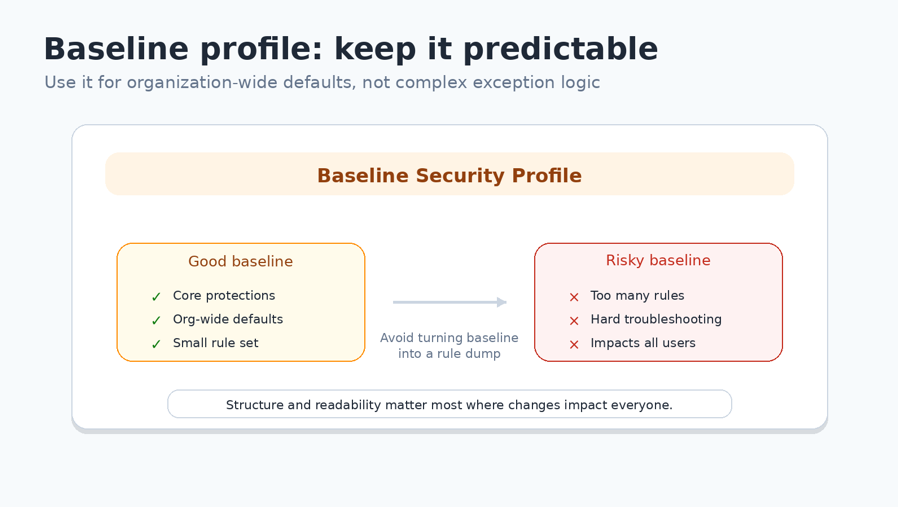
It’s important to understand that this applies to the baseline profile as well.
Even in the baseline Security Profile, you are limited to one V2 policy per type.
Because everything lives in a single policy, structure and readability become critical, especially in the baseline, where changes impact all users.
So, limit the number of rules in the policy within the baseline profile as much as possible.
To wrap things up
The shift from V1 to V2 Web Content Filtering in Global Secure Access is bigger than it seems.
At its core, you still have the same capabilities, blocking, allowing, and controlling access. But the way you design and apply that logic has changed completely.
Where V1 relied on stacking policies, V2 forces you to think in structured rules and well-defined Security Profiles. What feels restrictive at first actually leads to cleaner, more predictable designs.
At the same time, V2 introduces more context-aware capabilities, like traffic types and HTTP methods, allowing you to control not just where users go, but what they do.
That’s the real shift.
You’re no longer just deciding where users can go, you’re defining what they’re allowed to do once they get there.
If you approach V2 as a limitation, it will slow you down.
If you approach it as a new design model, it will give you more control.
And in the end, most challenges aren’t caused by the platform, but by trying to apply a V1 mindset to a V2 design.
Thanks for reading! I hope you enjoyed this post, and I hope to see you again in the next one.
Feel free to leave a message if you enjoyed this article, have questions, feedback, or if you spotted something that could be improved. I would really appreciate it.