Web Content Filtering
20-05-2026 read time: 5min.

Welcome back to another blog post about GSA! This time I will talk about Web content filtering & overrides which you can use to block and allow access to websites.
It has been a while since my last post, mainly because I was busy preparing a session on GSA Private Access and presenting at EUCTech Denmark.
It was a great experience, so thanks for your patience and for checking out my previous articles in the meantime. Now let’s take a closer look at web content filtering.
Web Content Filtering Policies
The first thing you need to do to filter on a website is create a Web content filtering policy.
To create a Web Content Filtering policy:
- Click on the plus (+) Create policy button
- Provide a name and optional description (e.g. “Block WhatsApp”)
- Select the action (Allow or Block)
- Add one or more rules and choose the destination type (web category, FQDN or URL)
This is where it gets interesting:
Currently, there are 59 web categories available for filtering, including categories such as Pornography and Sexually Explicit, Gambling, Artificial Intelligence and many more.
When configuring rules, you can choose between FQDN and URL filtering. At this point you might wonder: what is the actual difference between the two?
FQDN filtering is used to filter entire domains, such as google.com. However, this does not automatically include subdomains like www.google.com or others. This is something that is easily overlooked and can result in unintended access. To make sure you cover both the root domain and all subdomains, you need to define multiple entries, for example: google.com and *.google.com. These can be combined within a single rule by separating them with a comma.
URL filtering, on the other hand, allows for more granular control by targeting specific paths within a domain. For example, if you want to allow general access to google.com but block Google Maps, you can create a rule for www.google.com/maps. This way, Maps will be blocked while the rest of the website remains accessible.
So, if you want to block an entire domain, use FQDN filtering. If you want to block a specific page within a website, use URL filtering.
One thing to keep in mind is that modern applications often rely on multiple domains and dynamically generated URLs. While URL filtering gives you more precision, it also makes it more complex to implement and maintain in practice.
Override policy
Now the fun begins! You can block the whole category of for example Artificial Intelligence for the purpose of preventing shadow AI and when requested via an access package you can allow the use of ChatGPT or Gemini. By assigning a higher priority to the override profile, the allow rule takes precedence. And if the access package expires, the same user who was temporarily allowed to use ChatGPT or Gemini, won’t be allowed to use these tools anymore.
This approach gives you a flexible way to balance security and usability, without losing control over who can access what.
Designing your solution
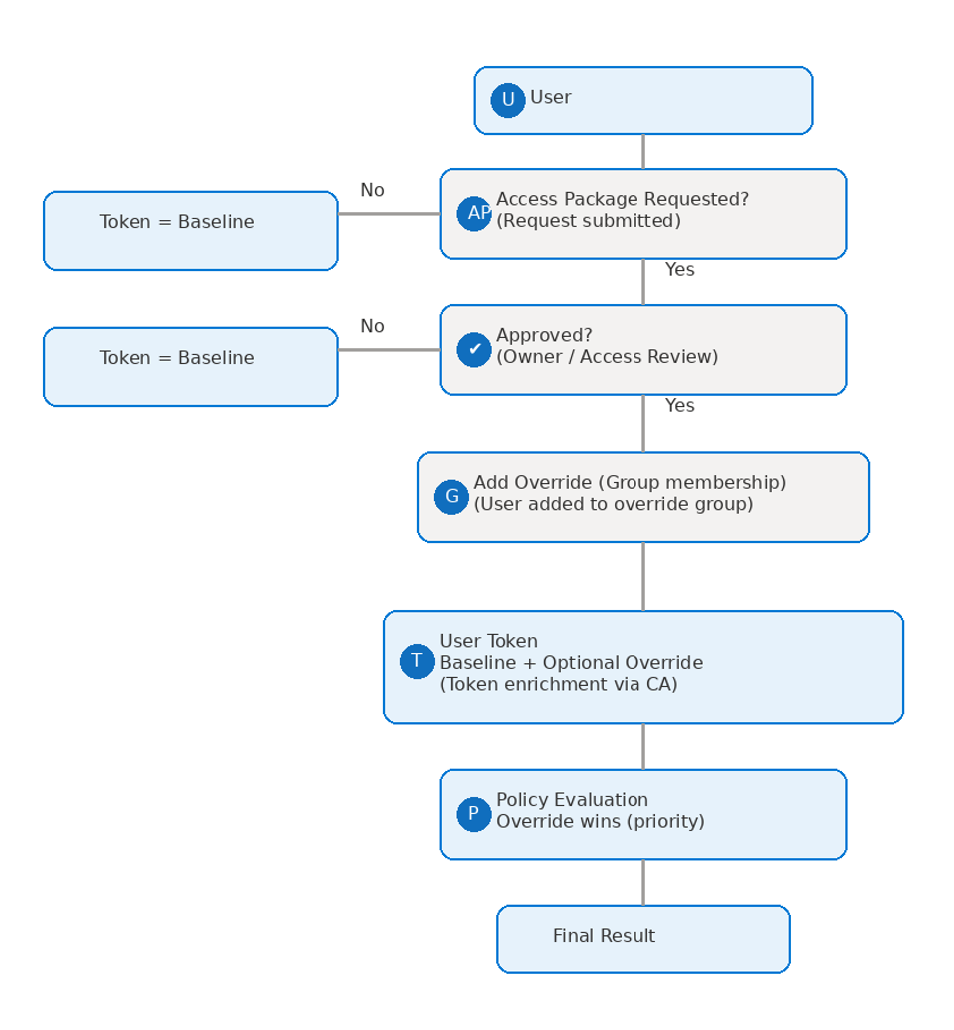
I have created a design for a customer based on the following principles:
- Governance-driven access
- Exception-based design
- Priority model
The design looks like this:
- A baseline profile blocks high-risk categories such as Artificial Intelligence and specific applications like WhatsApp
- Override profiles are used to allow specific tools based on user eligibility
- Access is governed using Access Packages and periodic Access Reviews
- Conditional Access policies ensure security profiles are assigned to users and are added to their secure access token
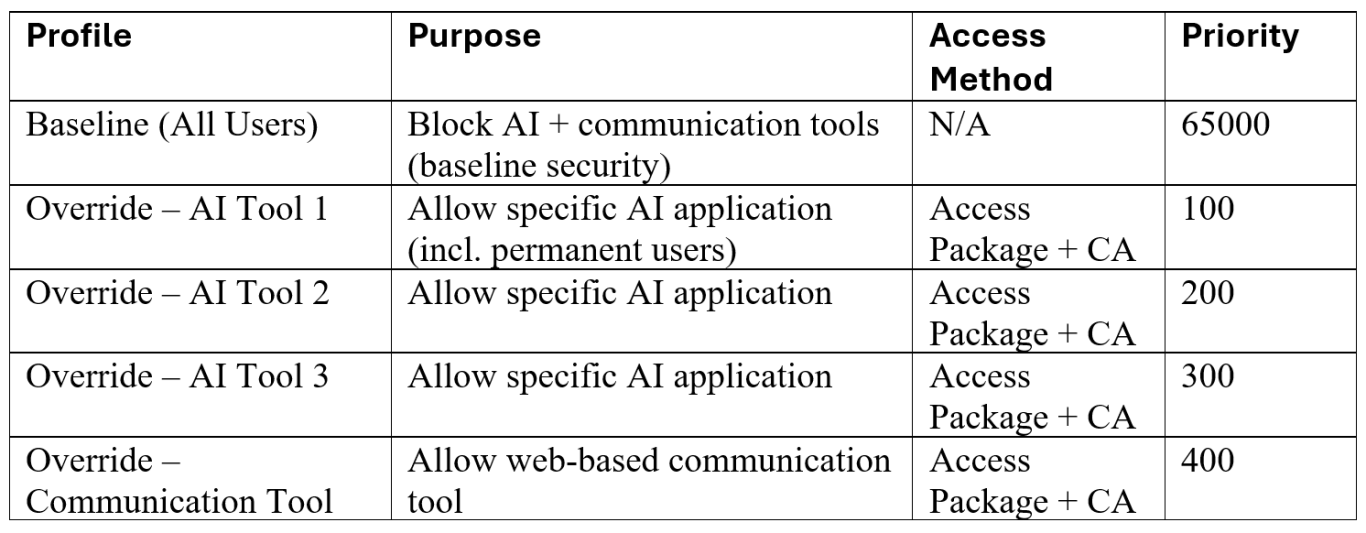
Priorities are assigned in a way where lower numbers take precedence.
Override profiles are therefore configured with a higher priority than the baseline profile, ensuring that approved access always overrules the default restrictions.
Of course, this is a simplified version of the design, but it reflects an approach that can be applied in real-world scenarios.
The next step is to add Access Reviews to the Access Packages. This allows you to grant exceptions while still keeping control over whether access is still needed.
Governance around exceptions
Every organization is different and will have its own requirements. That also means there is no single design that fits everyone. What is important, however, is that the process around exceptions is set up properly. If users can request access to specific tools, there should also be a clear approval process and a periodic review to check whether access is still needed. Without that, exceptions can quickly pile up and become hard to manage, which can still lead to unwanted usage and shadow AI.
Conclusion
Web Content Filtering within GSA provides a powerful way to control access to the internet in a structured and manageable way.
By combining category-based filtering with FQDN and URL rules, you can create a flexible baseline that fits most scenarios. Adding override profiles on top of that allows you to grant access where needed, without losing control or increasing risk.
When combined with governance concepts such as Access Packages and Access Reviews, this approach not only improves security, but also ensures that access remains controlled over time.
While every environment is different, starting with a clear baseline and handling exceptions in a structured way is key to building a scalable and maintainable solution.
Feel free to leave a message if you enjoyed this article, have questions, feedback, or if you spotted something that could be improved. I would really appreciate it.
Thanks for reading! I hope you enjoyed this post, and I hope to see you again in the next one.